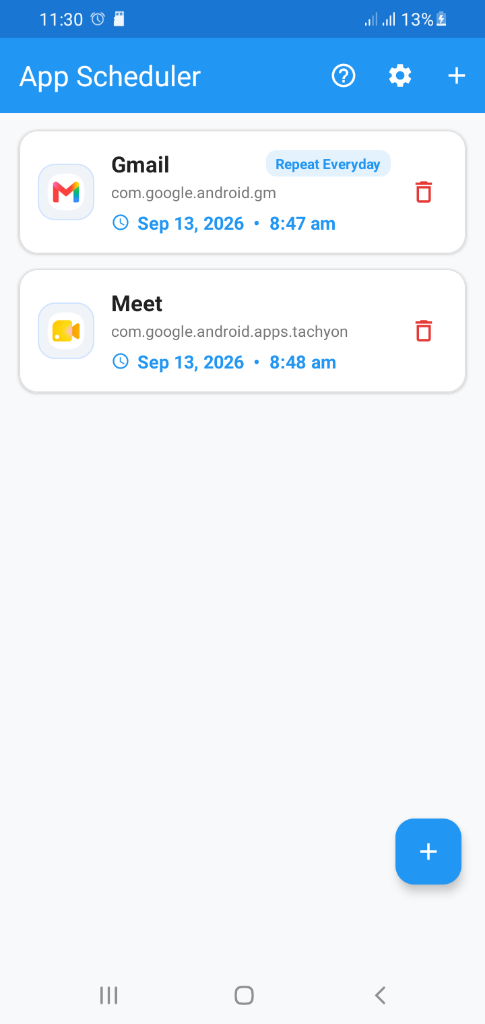
App Overview

What the App Does

Appopener App Scheduler is a productivity tool that lets you plan tasks on a timeline, assign apps to each task, and automatically open those apps when it's time to work. Instead of manually switching between apps or forgetting what to do next, you set up your schedule once and let the app handle the rest. Whether you need to open your calendar at 9 AM, your code editor during a focus block, or your support dashboard at shift start, Appopener launches the right app at the right moment.

The app combines a visual timeline scheduler with smart reminders and team schedule sharing. You can create recurring tasks, block out focus time, and sync with your existing calendar. When a task is about to start, you get a reminder notification, and when it starts, the linked app opens automatically. This reduces context switching, keeps you on track, and makes your workflow predictable.

Who It Is For

Appopener is built for individuals and teams who want to stay organized without constant manual effort. Solo professionals—freelancers, consultants, and remote workers—use it to structure their day and avoid decision fatigue about which app to open next. Small teams and operations groups use it to align schedules, coordinate standups and releases, and ensure everyone opens the right tools at the right time. Support and QA teams run repeatable workflows where specific apps open at shift start or before handoffs.

If you juggle multiple apps, struggle with context switching, or want a simpler way to run time-based workflows, Appopener is designed for you. It works across Web, iOS, Android, Windows, and macOS, so you can stay consistent whether you're at a desk or on the go.

Key Benefits

Save time: No more opening apps manually or losing focus deciding what to do next. Your tools open when you need them.

Stay consistent: Recurring schedules and reminders help you build routines. Morning check-in, focus blocks, and end-of-day wrap-up happen on schedule.

Reduce context switching: By opening the right app for each task, you spend less time hopping between tools and more time in flow.

Collaborate better: Team schedule sharing lets you see when colleagues are busy, avoid conflicts, and align on shared timelines.

Automate workflows: For operations, support, and QA, Appopener can trigger the same app-opening sequence every day, reducing setup errors and keeping processes reliable.

Built For Smart Scheduling

Appopener keeps your day predictable with clear priorities, instant app access, and focused scheduling tools for individuals and teams.

Appopener feature preview on mobile screens

Timeline Scheduler

Drag, drop, and rebalance your tasks in seconds so your next action is always clear.

One-Tap Open

Launch your most-used apps and workflows at the exact moment you planned them.

Smart Reminders

Get context-aware reminders before important sessions, meetings, and deadlines.

Team Schedule Sharing

Share working blocks with your team and avoid collisions across projects and time zones.

How to Use the App

Follow this step-by-step guide to get the most out of Appopener. We've included tips and examples to help you succeed.

1. Plan Your Timeline

Create a schedule for meetings, focus blocks, and recurring tasks in one calendar view.

2. Connect Your App Workflow

Set the apps you want to open for each task so your tools launch when work starts.

3. Run On-Time With Reminders

Receive reminder alerts before every session and keep projects moving without missed deadlines.

Tips and Examples

  • Morning routine: Schedule your calendar, email, and task app to open at 8:30 AM so you start the day with context.
  • Focus blocks: Set a 2-hour block and link your code editor or writing app. When the block starts, the app opens automatically.
  • Standup prep: Open your project tool and Slack 5 minutes before standup. No more scrambling to find the right tab.
  • End-of-day wrap-up: Schedule a 15-minute block with your notes app and task manager to capture what you accomplished.

Best App Scheduler Use Cases

Appopener combines task scheduling, app opening automation, and smart reminders to keep teams and individuals on schedule.

App Scheduler For Teams

Coordinate standups, release windows, and client calls with shared timelines and reminders across your team.

Task Scheduling For Solo Work

Plan deep work sessions, auto-open your tools, and keep a daily routine without context switching.

Workflow Automation For Operations

Trigger repeatable app-opening schedules for support, QA, and operations workflows that run every day.

See Appopener In Action

Watch how fast it is to schedule, open, and run your day.

Appopener Screens

Preview your dashboard, reminders, and timeline views designed for high-speed planning.

Appopener app screenshot 1
Appopener app screenshot 2
Appopener app screenshot 3
Appopener app screenshot 4
Appopener app screenshot 5
Appopener app screenshot 6
Appopener app screenshot 7
Appopener app screenshot 8
Appopener app screenshot 9
Appopener app screenshot 10

Open The App Anytime

Use Appopener on mobile or desktop and keep your schedule available whenever work starts.

What Users Say

Teams and individuals use Appopener to stay on schedule and reduce app-switching friction.

"Appopener cut my morning setup time in half. My calendar, notes, and Slack open right when I need them. Game changer for remote work."

Sarah M.

Product Manager

"I use it to block focus time and auto-open my code editor. No more wondering which app to open—it just happens. My productivity jumped."

James K.

Freelance Developer

"We schedule our support tool and ticket queue to open at shift start. Everyone stays aligned. Highly recommend for ops teams."

Lisa T.

Support Team Lead

FAQ

Appopener is an app-first scheduler that helps you plan tasks and launch the right app at the right time from one timeline.
Create an account, choose your primary apps, and import your calendar. Most users are fully set up in under five minutes.
Yes. Appopener includes a free plan for personal scheduling, plus premium plans for advanced automation and team coordination.
Team workspaces support role-based access, private events, and secure sharing controls for each schedule.
Reach out through the contact form, in-app chat, or email support for fast onboarding and technical help.
Appopener works on Web, iOS, Android, Windows, and macOS. Your schedule syncs across devices so you can switch between phone, tablet, and desktop seamlessly.
Yes. Appopener lets you schedule app launches on Android at specific times. Set up your timeline, assign apps to tasks, and they will open when it's time to work.
Appopener uses system-level scheduling to trigger app launches at predefined times. You create a schedule, link each task to the app you need, and the app opens automatically when the task starts.
Yes. We use encryption and follow security best practices. Your schedule and preferences stay private. See our Privacy Policy for full details.

Talk To The Appopener Team

Need a custom setup for your company? Send us a message and we will help you launch quickly.

Office

500 Market Street, San Francisco, CA